The full record
Everything that ships today.
Eight chapters, no roadmap items, no “coming soon”. Every line below is in the app you can download right now — and where something is limited on the free tier, it says so.
I
Food
Logging is the part everyone quits. So we built four ways in and let you pick whichever is fastest for the meal in front of you — the barcode for the yoghurt you eat every morning, the camera for someone else's cooking, your voice when your hands are covered in it.
- Food search
- Branded, restaurant, and common foods. Free, unlimited.
- Barcode scan
- Free and unlimited. It is the fastest path and it should not cost anything.
- AI photo estimate
- Point the camera at a plate. You get an editable estimate, not a verdict.
- Nutrition label scan
- Scan the panel instead of typing eleven numbers off the back of a box.
- Voice logging
- Say what you ate and edit what it heard.
- Natural-language entry
- Type "two eggs and a bagel" and fix the parts it got wrong.
- Quick calories
- For when you genuinely only know the number.
- Saved foods & meals
- No cap on the free tier. Your regulars should be one tap.
- Recipes
- Build them by hand. Free and unlimited.
- Recipe import from a URL
- Premium. Pull a recipe straight off a page.
- Grocery list
- Assembled from the recipes you saved.
- Food schedule
- Arrange foods you picked onto a calendar. It does not tell you what to eat. Premium.
- Fiber, vitamins & minerals
- Tracked alongside macros when the food source provides them.
II
Training
We were tired of food apps that treat a workout as a checkbox. This is a real logger: RIR on every set, drop sets and supersets marked properly, a rest timer that lives on your lock screen so you are not staring at the app between sets.
- Sets, reps, weight, RIR
- The full record of what you actually did.
- Warmup, working & drop sets
- Marked separately, because they are not the same thing.
- Supersets & giant sets
- Two exercises or ten. Rest holds until the whole round is done, and you can log them from the watch.
- Rest timer
- Runs as an iOS Live Activity — visible without opening the app.
- Plate calculator
- Free. Charging for arithmetic felt absurd.
- PR detection
- Flagged the moment you land one.
- One-rep-max detail
- Per lift, tracked over time.
- Templates & Quick Start
- Tap to start, hold to edit. Your usual sessions, one tap away.
- Progressive overload
- It prescribes the next session — load or reps — from your last one and the RIR you logged. Change any of it before you lift.
- Last-time cues
- What you did last time, on the row, while you decide.
- Exercise library
- Filtered by the equipment you actually have.
- Import your history
- Bring years of training over from Strong, Hevy, or any app that exports CSV. Free.
- Routine library
- Four built-in splits — full body, upper/lower, push/pull/legs, dumbbell-only — installable as your plan. Free.
- Per-exercise rest timers
- Three minutes on squats, sixty seconds on curls. Set once, it remembers.
- Exercise notes
- The note you wrote in March is on the card in August, when you are setting the machine up.
- Per-exercise rep ranges
- A five-rep window on a compound, twelve on an accessory. The progression respects it.
- Fit My Workout
- Keep the plan, fit this workout — sized to your time and equipment, without editing your saved cycle.
- Training targets
- Weekly set counts by muscle group.
- Shared workouts
- Premium. Send a session to someone else.
- Buddy sessions
- Two people, one live session, in real time.
- Coach review
- A read on the session you just finished, from what you logged.
III
Cardio
Cardio in a lifting app is usually an afterthought — a text field and a calorie guess. Ours has its own logger, its own timer, and it accepts the sessions your watch already recorded.
- 13 activity types
- From walking to rowing, not just "cardio".
- Quick cardio
- Two taps for a walk you already did.
- Live timer
- Track your time live — pause and end whenever.
- History & editing
- Fix the entry you fat-fingered.
- Apple Health import
- Bring in runs and rides recorded elsewhere.
- One history with lifts
- Strength and cardio together. Tap any session for the full record.
IV
Progress
This is the payoff for logging at all. Every number here is computed from sets you entered — nothing is guessed, and nothing is imported and passed off as yours. Weight moves slowly and unhelpfully day to day, so the views that matter are the long ones.
- Estimated 1RM
- From your best logged set, using the Epley formula.
- Strength balance
- Working sets versus the previous range — what is leading and what is lagging.
- Muscle recency map
- When each muscle group last appeared in your working sets. Context for planning, not a recovery score.
- Weight & body fat
- Entry plus the trend that actually matters.
- Full measurements
- Waist, chest, hips, arms, thighs, neck.
- Progress photos
- Private by default. Shared only if you choose.
- Volume trend
- Session tonnage across time.
- PR board
- Every lift you have beaten.
- Training calendar & heatmap
- What showing up actually looked like.
- Six ranges
- 14D · 30D · 90D · 6M · 1Y · All. 14D and 30D free; the longer ranges on Premium.
V
Routines
The Consistency Board is the part we did not expect to use most. Daily Wins fill themselves in from logs you already made, so the board is honest without extra tapping — and the habits you add by hand sit next to them.
- Daily Wins
- Fill automatically from what you logged. No double entry.
- Custom habits
- Your own, checked off by hand.
- Hydration
- Tracked, with settings that stick.
- Fasting timer
- Free and unlimited. Extra protocols and analytics on Premium.
- Reminders
- One active on the free tier. Premium runs as many as you want.
- Habit timeline
- The run of days behind the current streak.
- Habit strength
- Just starting, Finding it, Building, Strong, or Locked in — from your recent history.
- Achievements
- Eight of them, earned from records you kept.
VI
League & Squads
We did not want a feed full of strangers. A Squad is a small group with a shared streak, a dashboard showing who is about to break it, and a nudge button. That is the whole social product, and it is enough.
- Squads
- A small group with a streak you hold together.
- Squad dashboard
- Members, streak pressure, and activity.
- Nudges
- Poke someone before their streak dies.
- Personal League
- Today's board, your level, and your total XP.
- Friends & leaderboard
- People you actually know.
- Referrals
- Give 14 days, get 14 days. Unlimited.
- Progress photo sharing
- Private by default. Shared only if you choose.
- Squad chat
- With reporting, blocking, and a profanity filter.
VII
PlateStack Coach
The Coach reads the records you keep — recent sessions, RIR, what you logged — and answers from those. It drafts plans you then edit. We are deliberately unexcited in how we describe it: it is useful, it is not a professional, and every output is yours to change.
- Coach chat
- Uses your logged workouts, RIR, goals, equipment, and saved plan. 3 messages/month free.
- Coach's take
- A read on the session you just finished, against your own benchmarks.
- Coach memory
- Remembers the context you gave it.
- Editable workout plans
- Builds a starting draft. Review it, then swap or resize anything before saving.
- Meal plan drafts
- Premium. A week you can actually follow — every item editable. Each draft uses AI credits.
- Weekly log summaries
- A non-clinical summary of what you recorded.
VIII
On your devices
Most of the time you should not need to open the app at all. The widget carries today and logs a saved food in one tap, the watch runs the session, and Siri handles the rest.
- Apple Watch app
- Start your planned workout, log each set, rest timer on your wrist.
- Log by voice on the watch
- Speak what you ate. The estimate comes back on the wrist for you to approve before anything is written — and it stays undoable after.
- Watch complications
- Calories left on the face you already use.
- Home screen widget
- Calories left as a ring, protein as a bar, and three one-tap buttons for your most-logged foods.
- Lock Screen widgets
- Calories left as a gauge, or calories and protein on one line.
- Control Center & Action button
- A tile that logs your saved food without opening anything.
- Siri
- "Log my usual in PlateStack" logs hands-free. "Log food in PlateStack" asks what you ate, then opens the estimate to confirm.
- Live Activities
- The rest timer, on the lock screen.
- Apple Health
- Import supported records for display. Optional.
- Recovery score
- Compares your HRV, resting heart rate and sleep to your own recent baselines — never to anyone else. Below two available signals it declines to produce a number and says which are missing.
- Nine themes
- Precision, Core, Clean, Ember, Midnight, Iron, Mono, Bloom, Grove.
- Sign in with Apple & Google
- Plus email and password.
- Data export & deletion
- Both are in the app, not buried in a support ticket.
All of it, on one phone.
-
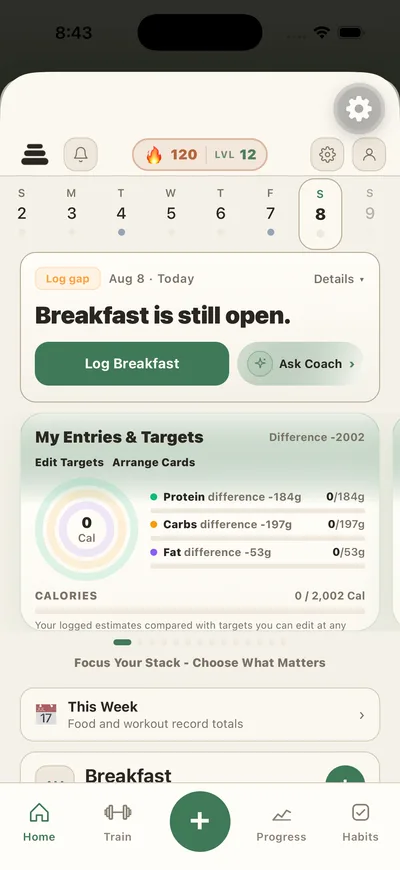
Today
What’s logged, what’s open, and the one thing to do next.
-
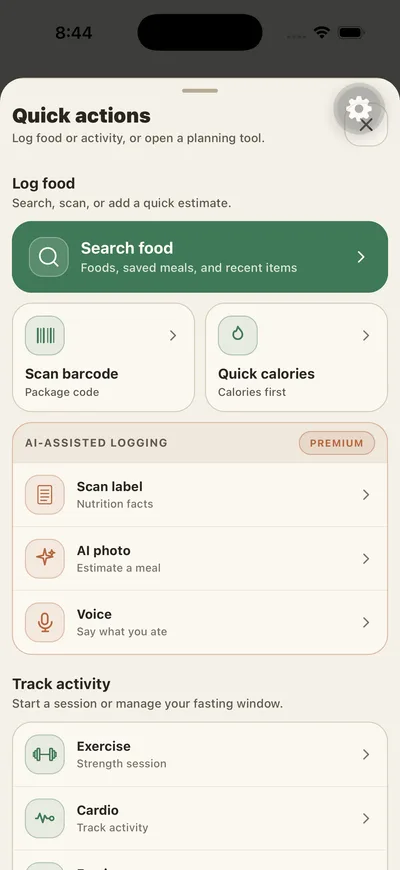
Quick add
Search, barcode, and quick calories on top. AI logging underneath, clearly marked.
-
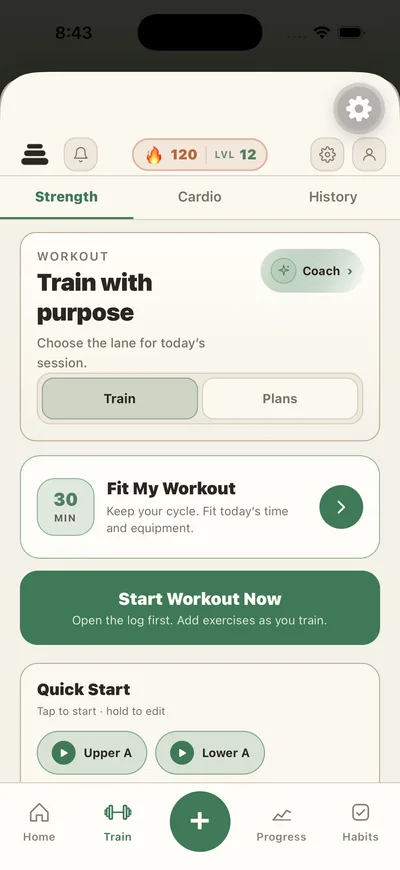
Train
Strength, cardio, and history. Quick Starts are the routines you already run.
-
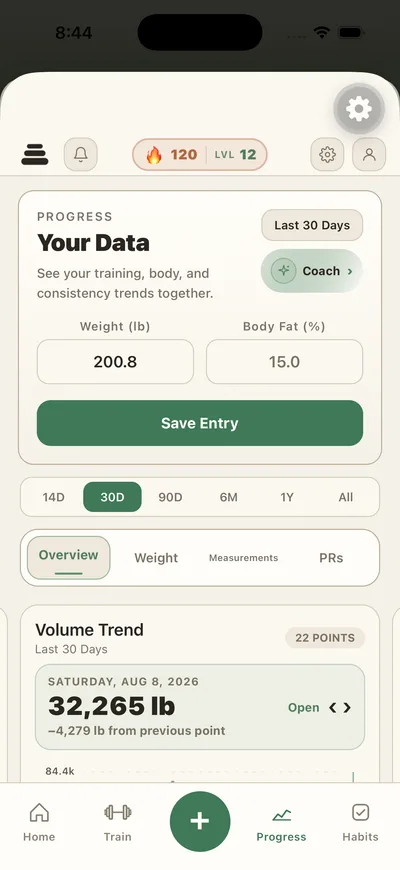
Progress
Overview, weight, measurements, and PRs, with volume trend underneath.
-
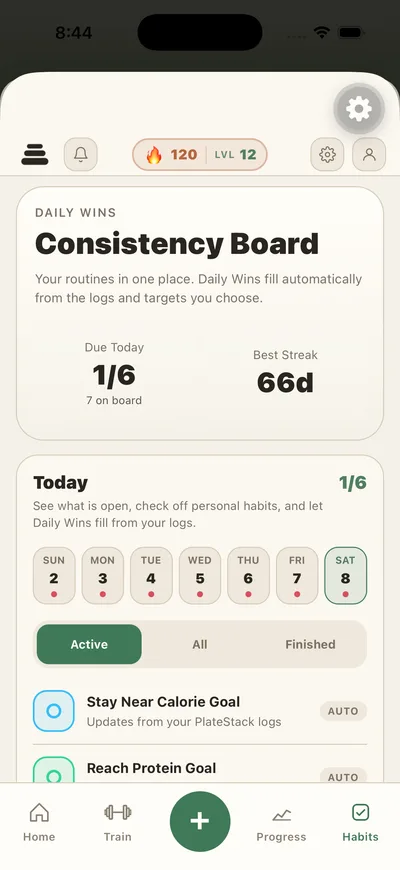
Daily Wins
Due today, best streak, and the habits that fill themselves from your logs.
-
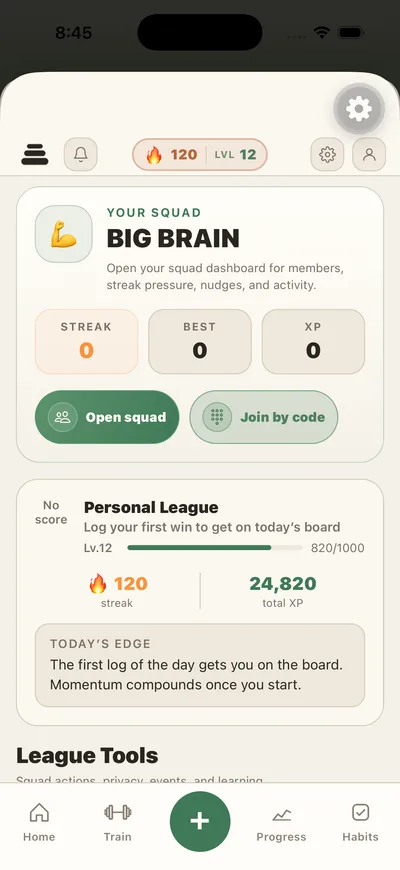
League
Your squad, the personal league board, and league tools.
FAQ
About the app itself.
- Is PlateStack just a calorie counter?
- No. It logs food, strength training, cardio, body measurements, and daily routines in one place, and the score is built from all of them.
- Can I log food manually without using AI?
- Yes. Search, barcode scanning, saved foods, meals, recipes, and quick calories are all free and unlimited. The AI features are optional shortcuts.
- What does the Daily Score measure?
- Whether you recorded things. Logging any food is 40 points, logging a workout is 40, and your routines carry the last 20. Hitting a calorie or protein target earns nothing — that is deliberate.
- Do I need an Apple Watch?
- No. There is a watch app and complications if you have one, but everything works on the iPhone alone.
- Are the AI nutrition estimates accurate?
- They are estimates and they can be wrong. Every value is editable before it is saved, and you should verify labels, ingredients, allergens, and portions yourself.
Start the record today.
Free on the App Store. Premium is $1.99 a month or $14.99 a year when you want the rest.
Free to start
Premium $1.99/mo · $14.99/yr