Free on the App Store · iPhone & Apple Watch
Log faster. Train with context.
PlateStack connects food, strength, cardio, habits, fasting, hydration, and progress in one record. Log the day once, then use that context to make the next meal or workout easier.
Free to start. Premium is $1.99 a month — or $14.99 a year, about $1.25 a month.
No ads. No data sales.
- 7
- things tracked, one record
- 6
- ways to log food
- 13
- cardio activity types
- 0
- ads, ever
One record, three advantages
Less app juggling. Better next decisions.
PlateStack does not try to out-specialize every single-purpose tracker. It connects the parts they leave apart, keeps the source visible, and lets you approve what AI changes.
-
01 · Log faster
Food logging that shows its work.
Search, barcode, manual entry, photo, label, and voice all lead to an editable record. PlateStack labels verified matches and uncertain estimates so you know what to trust and what to review.
Six logging paths · visible provenance · reusable foods and meals
-
02 · Train with context
Your last session is already waiting.
Loads, reps, RIR, rest timers, supersets, PRs, and recent Apple Health records stay beside the workout. PlateStack uses your own history for comparisons without pretending it is a recovery score.
Prefilled sets · RIR-aware guidance · one strength and cardio history
-
03 · One connected Coach
Ask once. Review before anything changes.
Coach can use the PlateStack records you choose to draft workouts, workout plans, and meal plans. You review and edit the result before approving it into your data.
Grounded context · editable drafts · explicit approval
The logging core stays free. Premium adds the connected planning, Coach, and deeper history layer.
Compare PlateStack →Every record feeds the coach
Your records in. Editable drafts out.
PlateStack Coach can use the records you choose—workouts and RIR, goals, equipment, saved foods, meal history, and connected-health context—to answer questions or draft a plan.
It should say when context is missing. It does not apply a workout, workout plan, meal plan, or target change until you review and approve it.
Goes in
Logged sets and RIR · corrected portions · repeated foods · cardio sessions · body weight and measurements · habits and streaks · your gym’s equipment · your goals and rep ranges
- 01
Ask
Compare recent sessions, explain a plateau, or find one useful next step.
- 02
Draft
Build an editable workout, workout plan, or meal plan from the context you approved.
- 03
Review
Change exercises, sets, foods, portions, days, or targets before anything is saved.
- 04
Approve
Write the finished draft into PlateStack only when you choose.
Inside the app
Built to be used between sets.
-
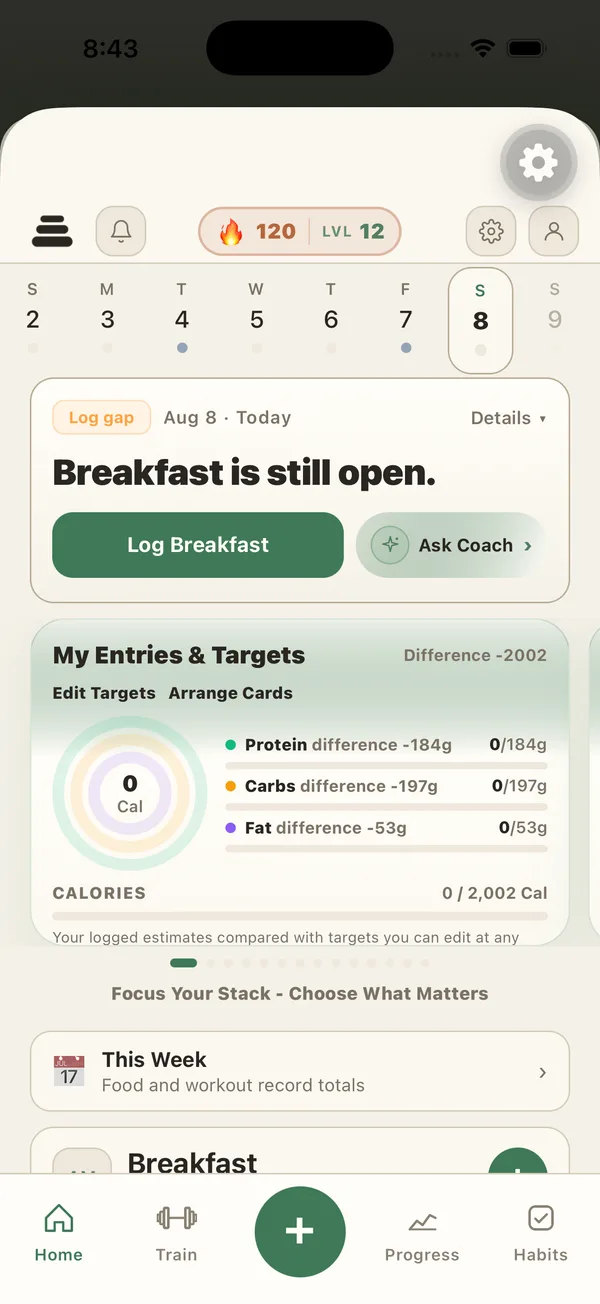
Today
What’s logged and what’s still open, in one honest view.
-
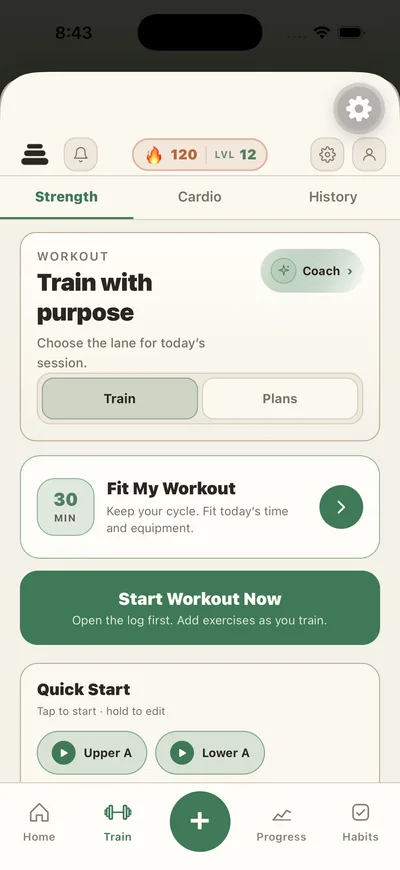
Train
RIR, supersets, drop sets, and a rest timer on your lock screen.
-
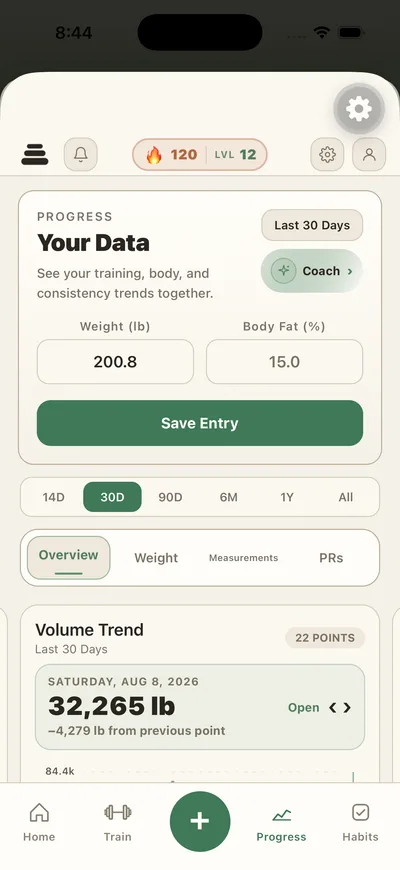
Progress
Tap any trend and see the sets it was computed from.
-
Food
Search, barcode, label scan, photo estimate, voice, natural language, saved meals, recipes, grocery list.
-
Training
Sets, reps, RIR, supersets, plate calculator, PR detection, progressive overload, CSV import from Strong or Hevy.
-
Cardio
13 activity types, live timer, quick entry, Apple Health import, one history shared with your lifts.
-
Progress
Estimated 1RM, strength balance, volume trend, PR board, measurements, photos, six ranges from 14D to All.
-
Routines
Daily Wins, custom habits, hydration, fasting timer, habit strength, 8 achievements.
-
League & Squads
A small group, a shared streak, a nudge button. No feed full of strangers.
Not just the phone
Leave your phone in the locker.
The three places you actually log from are the three places most trackers forget: your wrist mid-set, your home screen between meetings, and your lock screen while the rest timer runs.
-
On your wrist
Apple Watch app
Log sets between them without digging your phone out of your bag — supersets included.
-
On your home screen
Tap-to-log widget
Log hydration with one tap on the widget. The app never has to open.
-
On your lock screen
Live Activity rest timer
The timer runs where you can see it, so you are not staring at the app between sets.
No made-up numbers
You can always see where a number came from.
An entry that came from a trusted database, a barcode, or a confident scan is badged Verified. One the app is unsure about is badged Needs review, so you can correct the portion instead of inheriting a guess. What you typed yourself is counted exactly as entered.
Skip a meal and it shows as not logged, not as zero calories. And if the app doesn’t have enough history to answer something properly, it tells you that instead of making a number up.
- Verified
- Matched to a trusted nutrition database, a barcode, or a high-confidence scan.
- Needs review
- The estimate is uncertain. Open it and correct the portion before it settles.
- No badge
- You typed it yourself, so it is counted exactly as entered.
- Not enough yet
- Where a trend needs more history, it says what is missing rather than guessing.
Nothing watching you
No ads. No data sales. Clear controls.
This public website uses no advertising pixels, behavioural analytics, or tracking cookies. In-app product analytics are optional and only begin after you opt in. Progress photos are private by default.
- No website advertising pixels
- No website tracking cookies
- Optional in-app analytics
- Export or delete anytime
Pricing
Useful before you pay for anything.
The logging core is free forever, with no expiry. Premium is the compounding layer.
Starter
$0 forever
Track your day and learn your numbers, with no expiry.
- Food search, barcode, and manual logging
- Daily macro dashboard
- Workout logging, rest timer, PR detection
- Plate calculator and fasting timer
- Daily Wins, streaks, XP, and daily score
- Unlimited saved foods, meals, and recipes
- Up to 3 active Custom Habits
- Import your history from Strong or Hevy
- 3 Coach messages and 5 AI logging credits a month
Best value
Premium
$1.99 /month
or $14.99/year — about $1.25/mo. Starts with a 7-day free trial.
Annual saves $8.89 a year versus monthly billing.
- Everything in Starter
- AI Coach included, grounded in your own data
- Photo, label, and voice logging included
- 7-day AI meal plan generator
- Long-range history and advanced analytics
- Unlimited custom habits and reminders
- Weekly insights, full League & Squad tools
US App Store pricing; other storefronts may differ. Cancel in your Apple account settings.
FAQ
The questions we actually get.
Anything else, email [email protected]. The people who write the app read it.
- Can I bring my training history over?
- Yes. Import from Strong, Hevy, or anything that exports CSV — free, on the free tier.
- Is the free tier a trial?
- No. Food logging, barcode scanning, workout logging, the rest timer, PR detection, the plate calculator, the fasting timer, and Daily Wins stay free with no expiry. Premium itself starts with a 7-day free trial.
- How does Coach decide what to suggest?
- From the records you logged — sessions, RIR, goals, and the equipment you have. It names what it used, and anything it drafts stays editable before it counts for anything.
- How accurate is Coach?
- We do not publish an accuracy figure, because any single number would be misleading — Coach reasons over the records you logged, so it is exactly as complete as they are. What it is held to: it names Apple Health as the source when it discusses records from there, it says what is missing rather than guessing at it, and it compares you only to your own earlier entries — never to another person, an average, or a norm. Nothing it drafts is applied to your targets until you tap it, and AI output can be wrong, so every estimate stays editable.
- What happens to my data if I stop paying?
- Nothing is deleted. Premium features stop and the long-range views re-lock — on the free tier the progress screens show the last 30 days and fasting history shows your last 7 completed fasts — but every entry you made is still there, and a full export of all of it is one tap away in Settings.
- Is Android available?
- Not yet. iPhone, Apple Watch, and widgets are live today; Android is not available yet.
Your record already started
Keep tomorrow in one place.
Free on the App Store. Premium is $1.99 a month or $14.99 a year, whenever you want the rest.
Already using it? Refer a friend and you both get something for it.
Free to start
Premium $1.99/mo · $14.99/yr